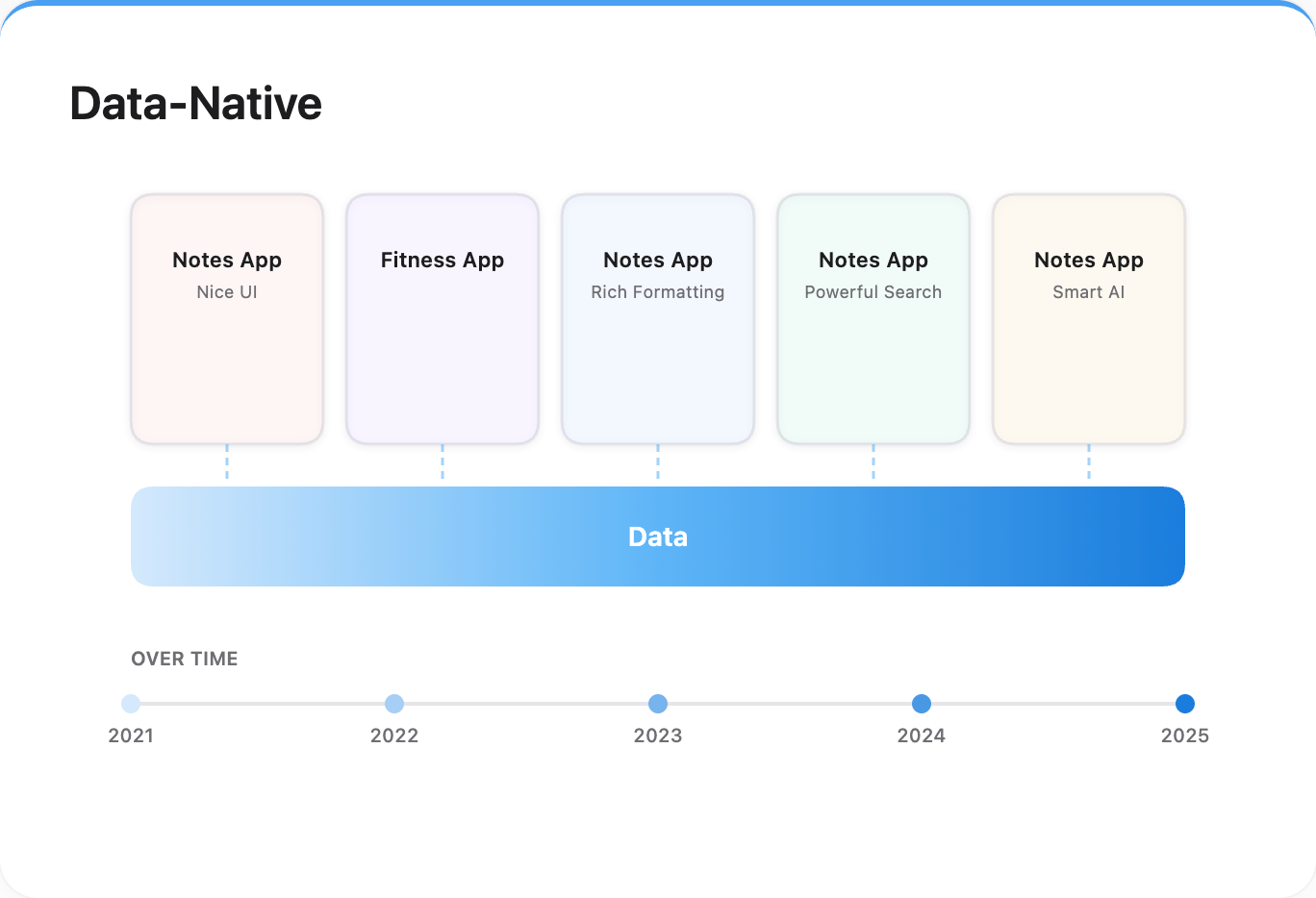
Data Native
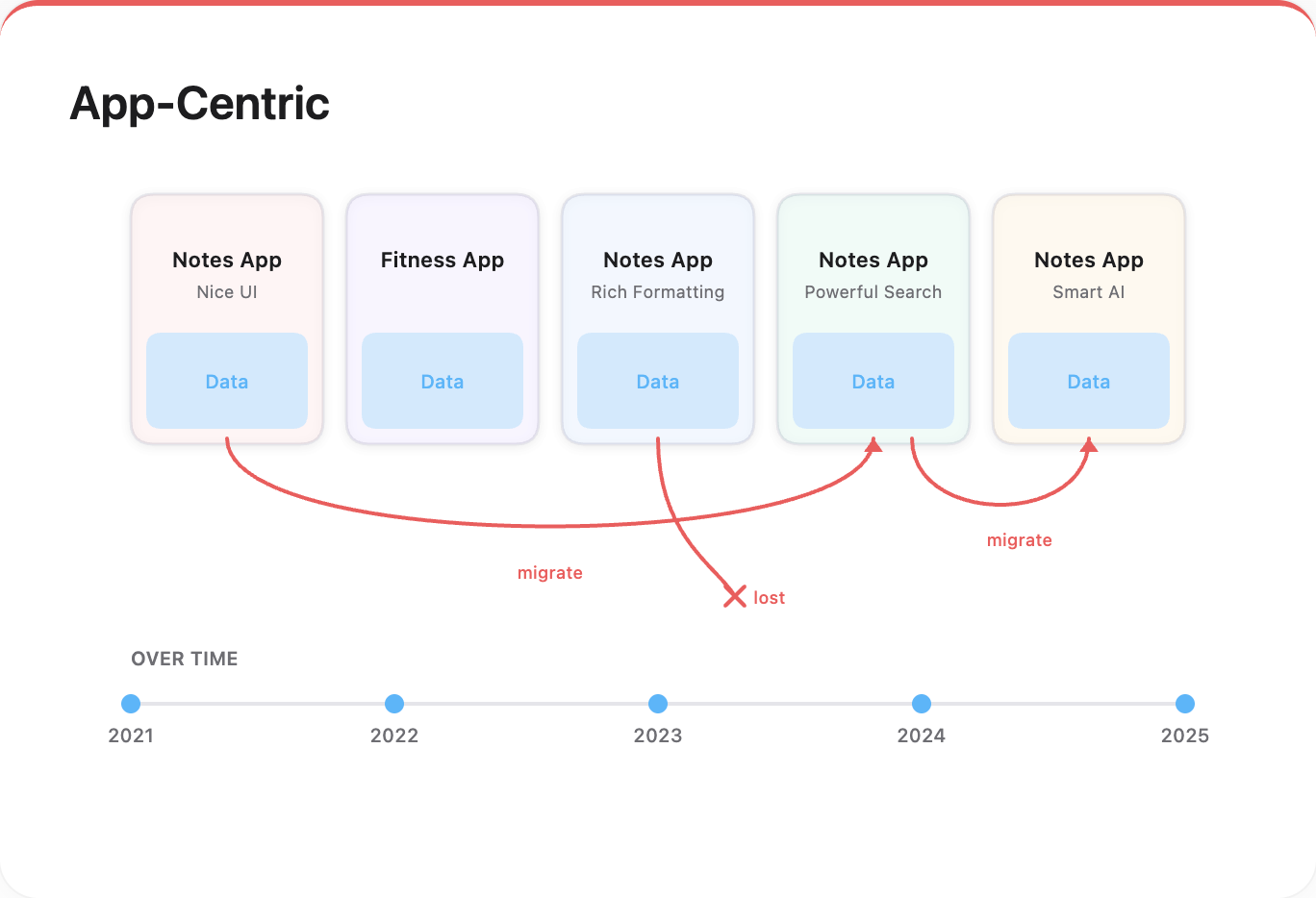
When was the last time you wanted to switch notes apps — but dreaded migrating all your data?
Every company knows data is valuable — but do you preserve yours? Your reading history, your favorite films, your travels, your five-star meals, your running routes, your thoughts and ideas.
You own and grow your data. Apps use it, contribute to it — but don’t take a cut.
There’s a better way — for users and app builders alike: Data Native.
 →
→
Why You Should Own and Grow Your Data
Take a step back, why do we even care about data native?
Own Your Data
Own means control, not custody. Compare: App A stores data on your local disk, but in a proprietary format with poor export. App B lets you choose local or cloud, but uses open formats and exports cleanly. Which one gives you more control?
Today most apps offer export options, so vendor lock-in isn’t the crisis it once was. The remaining issue is fragmentation: your data is scattered across many apps, and even with exports, pulling it together takes effort.
Grow Your Data
If the AI companion of the future ever comes true, data will be essential — and the more you have, the better it can serve you.
Today, companies use your data in shallow ways: your searches and clicks sell you products, your watch history trains recommendation algorithms. Useful, but limited.
Imagine deeper access: your searches, bookmarks, watch history, emails, calendars, messages, notes, photos, the places you go, the people you meet, your sleep, workouts, travels, habits, thoughts, goals. Today this sounds like data hoarding. Tomorrow, it could be what lets an AI truly know you.
As physical and mental labor get automated, what remains distinctly yours — your tastes, thoughts, connections to the real world — could be more valuable than ever.
What Is Data Native
Today most apps work in data silos — each app has its own database, its own format, its own way of organizing things. Want to switch? Export is the best they can offer.
Data native proposes:
- You own the source of truth for all your data.
- Data lives in folders of files, in open, common formats.
- You organize folders and structures your way.
- Apps adapt to your data.
- Apps can build caches and indexes for performance, but content goes into your data folder whenever possible.
Your data is the environment. Apps are visitors.
Why Now
In the past, due to technical complexity and business incentives to retain users, apps tended to work in isolation.
Apps Are Tiktoking
AI coding tools make building apps easier than ever. Apps are becoming more lightweight and transient. We’re even seeing instant apps built for a single purpose, used once, then discarded. More apps means more competition — and more shutdowns, pivots, acquihires. Apps come and go. Your data spans decades.
Rich Choices of Apps
How many notes or fitness apps have you come across and wanted to try? We already have thriving app ecosystems — and AI is accelerating this even further. We’d want effortless switching, or using multiple apps at once — no data loss, no migration hassle.
AI Makes Adaptive Apps Possible
Previously, most apps needed rigid structures to work. Only a few, like file explorers, could handle arbitrary user data. Today AI provides a way out, making it possible for more apps to adapt to how you organize things.
Your Data Is More Usable, Thus More Valuable
Previously, only tech companies had the ability to collect and utilize data at scale. Today with AI, individuals can also derive value from their own data — making it more worthwhile to own and grow.
How Data Native Works
It shifts complexity to apps, but the idea is simple.
The Data Folder
Folders and files, organized per your preferences.
Preferably in open, common formats — text over proprietary databases, markdown over custom formats — for maximum longevity, portability, and the widest app support.
Apps
Apps read from your data folder and adapt to your structure. With AI, they can understand your naming conventions, folder organization, and file formats.
Apps write content back to your data folder — in the same open formats and following the same structure conventions. Your data grows in one place.
Apps can build their own indexes, embeddings, or caches for performance and custom features — largely rebuildable. Switch apps? The new one reads your folder, rebuilds what it needs, and you’re ready. Some app-specific data may not carry over, but if it matters, it should be in user data folder. No export, no import, no lock-in.
Early Adopters
Obsidian stores your notes as plain markdown files. Immich lets you use external photo libraries. Obsidian users can easily use other tools with their data — like Claude Code or Gemini. Notion also offers AI features, but the difference in flexibility is clear.
Open Questions
Data native shifts responsibility to users and demands more from apps. Some things remain unsolved.
Security & Privacy
A centralized data folder is a high-value target. How do we grant apps access without exposing everything?
User Burden
Backup, sync, and data protection fall on users. Can we make this effortless?
App Coordination
Apps need to adapt to arbitrary structures. Multiple apps writing to the same folder could conflict. What conventions help?
A Starting Point
Data native is early — the app ecosystem isn’t there yet, and rough edges are everywhere. But you can start today.
Build Your Data Folder
Pick a place for your notes, photos, documents. Organize it your way. This is yours to keep, regardless of which apps come and go.
Try Data Native Apps
Obsidian for notes. Immich for photos. VS Code and Claude Code for coding. They read from your files, write back to your files, and don’t lock you in.
When Data Native Isn’t an Option
Pick apps that export cleanly — in open formats you can read and move.
If You Build Apps
Consider going data native. Let users keep what they create.